
1) Read pages 49-53 (start at "Loudness Levels") AND 190-203 (stop at "Digital Audio Transmission") of Modern recording techniques : a practical guide to modern music production. You can read and/or download the book online via the Columbia library system (you must be on the CU network for this to work):
https://clio.columbia.edu/catalog/17700222
2) Edit the "Passe Partout - Guitar Intro_tempo66.wav" audio file, which is linked below, so that the attacks (i.e., guitar "plucks") are on EVERY BEAT.
Download link:
https://we.tl/t-vJwrRb7nz6
Preliminary steps:
• Create a Logic project and save it as Assignment2_yourname, in your personal folder on the desktop of the studio computer (look for folder named RecordedSound-Summer2025). Make sure you save your project as a FOLDER, not as a package.
• Set the project tempo to 66.
• Make sure snap is ON
• Make sure the drag is on X-Fade
• Drag and drop the sound file. If asked to change to the file's sampling rate to match the project's sampling rate, click on YES.
• Remember that to make an edited region shorter or longer, you must click-hold on the lower right or left corner of the region (the cursor will turn into bracket when in the correct location).
• Have a backup drive with you to copy your work once done.
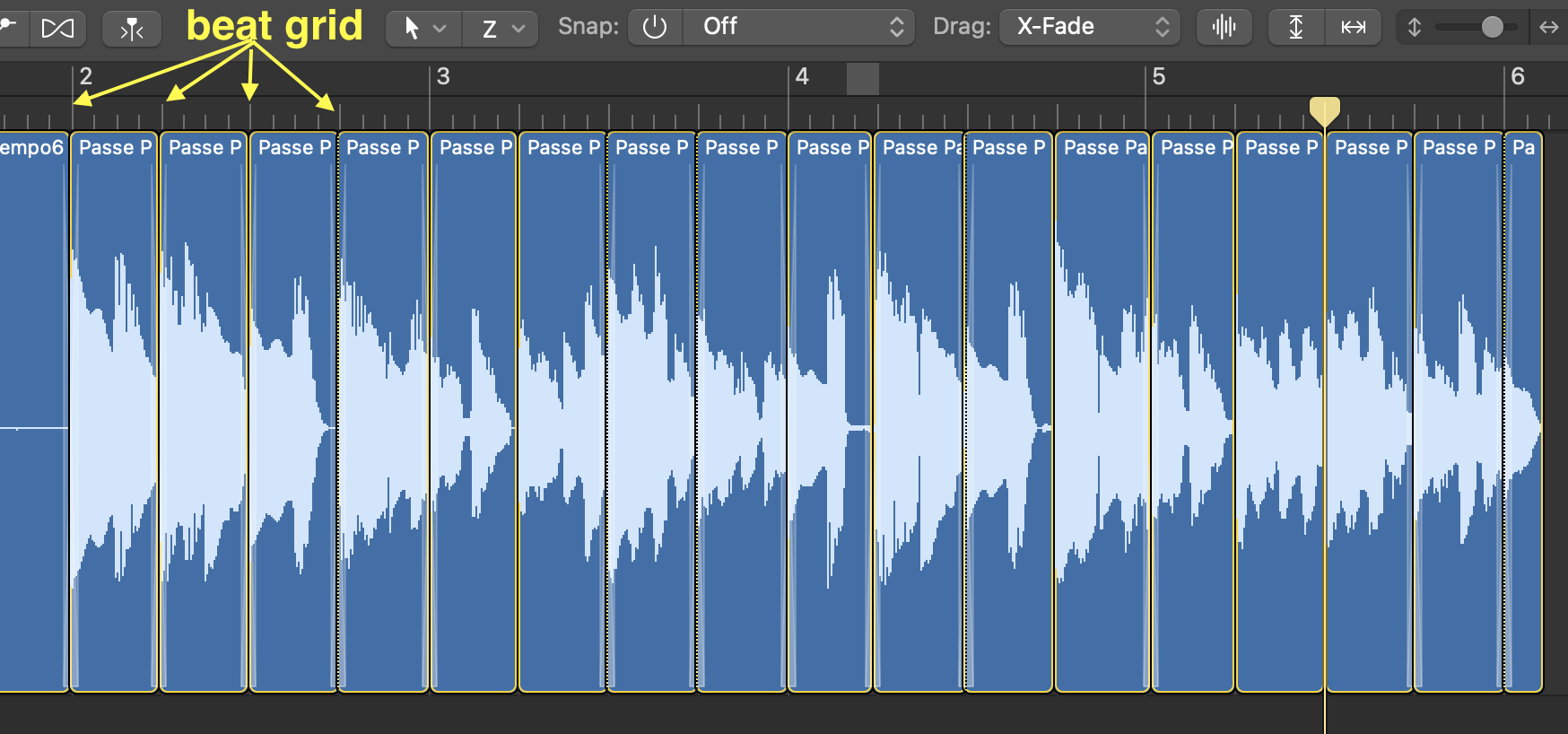
Then proceed with editing as discussed in class. The final edit should be as rhythmically "tight" (i.e., on the grid) as possible, and look something like this:
Editing reminders:
• Turn Snap OFF, then cut the audio just before the part you want to keep.
• Turn Snap ON, then move the part you want to keep to its desired location. Remember to set the snap to "absolute" value, not relative.
• If the regions overlap, pull the END of the region you want to remove to the grid.
• Turn Snap OFF, and pull to the LEFT the start of the region you want to keep over the preceding audio to create a cross-fade.
3) OPTIONAL (but please try if you can) Edit the BachPrelude #10 from the WTC book 1 (included in the download) to convert it from 4/4 time to 3/4 time. Only do the first four bars.
Preliminary steps:
• Create a NEW Logic project and save it as Assignment2-BACH_yourname, in your personal folder on the desktop of the studio computer. Make sure you save your project as a FOLDER, not as a package.
• Make sure snap is OFF
• Make sure the drag is on X-Fade
• Drag and drop the "Bach_WTC_Book_1_Prelude10.mp3" sound file. If asked to change to the file's sampling rate to match the project's sampling rate, click on YES.
• Have a backup drive with you to copy your work once done.
Then proceed with editing as discussed in class. Remember that here you are not editing to a grid, so the snap should always be off. Be careful about which beat you remove, your edit should sound as natural and musical as possible. Remember to only do the first FOUR bars (note, however, that in the score this corresponds to the first TWO bars since in my demonstration I was counting in double time).
Grading:
/3 Use of Crossfades
/3 No clicks
/4 Edits are "musical" or "natural" (edits make sense musically, and no quick double attacks from overlapping edits)
Total /10 points