
Description:
In teams of TWO, record five short 30sec clips of your voice or, if you'd prefer, various objects or instruments (can be anything). Don't worry about recording something interesting, the focus here is on getting comfortable with the signal path in 317 and obtaining a good, clean recording, with proper levels and a pleasant sound.
If needed, please see the Resources page, which has a Recording Cheat Sheet, and reminder pages on the Patchbay and Aviom devices.
NOTE1: Make sure all the devices on desk rack are turned ON.
NOTE2: set your mic gain ONLY by pressing the following buttons and dials:
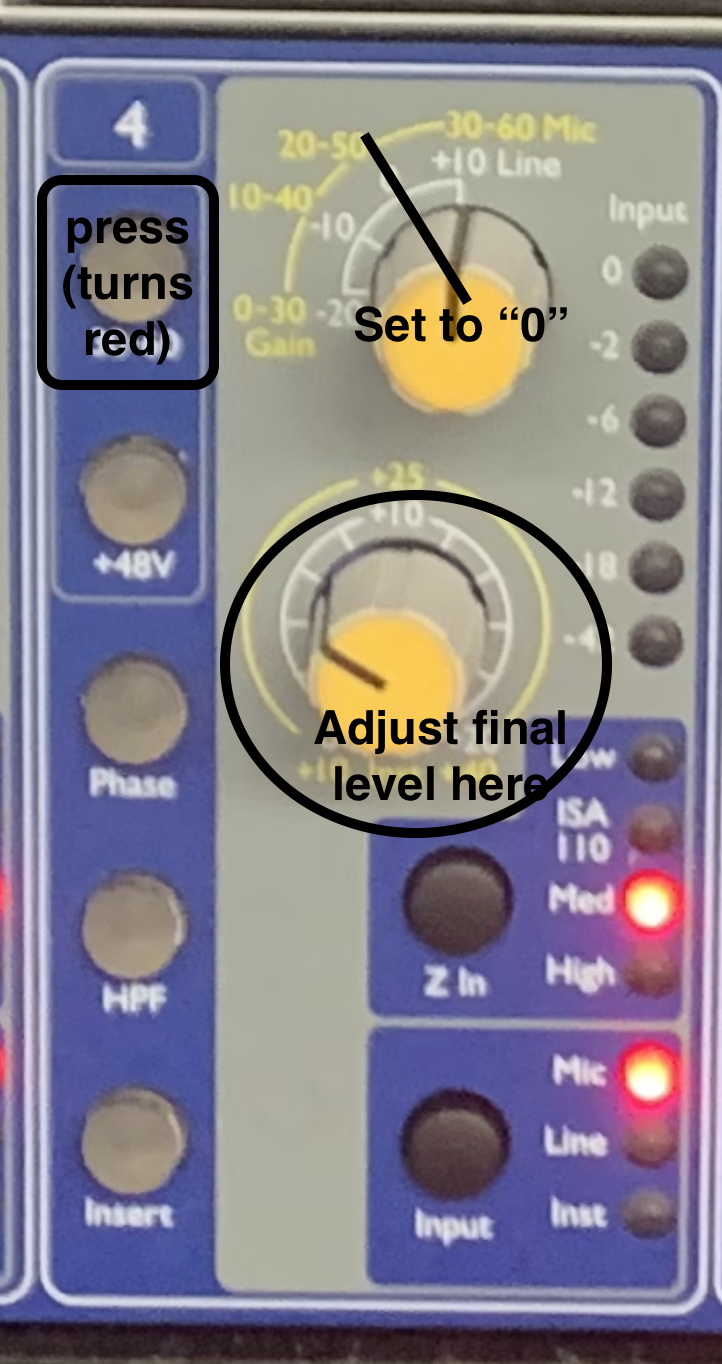
Tasks:
NOTE: All the sounds MUST be recorded in 317.
• Using only the Shure SM58 mics on the desk, create a new track and record some sounds for each of the following connection scenarios:
(REMEMBER: create a new track for each scenario)
1) mic in MAIN ROOM, connected to floor snake ch2, monitored on AVIOM ch1.
2) mic in MAIN ROOM, connected to FLOOR SNAKE ch1, but patched to 828 ch4, monitored on AVIOM ch5.
3) mic in BOOTH 1, patched to 828 ch8 which is then patched to UFX IN 34, monitored on AVIOM ch6, using TALK BACK mic to communicate (which is always on AVIOM ch16).
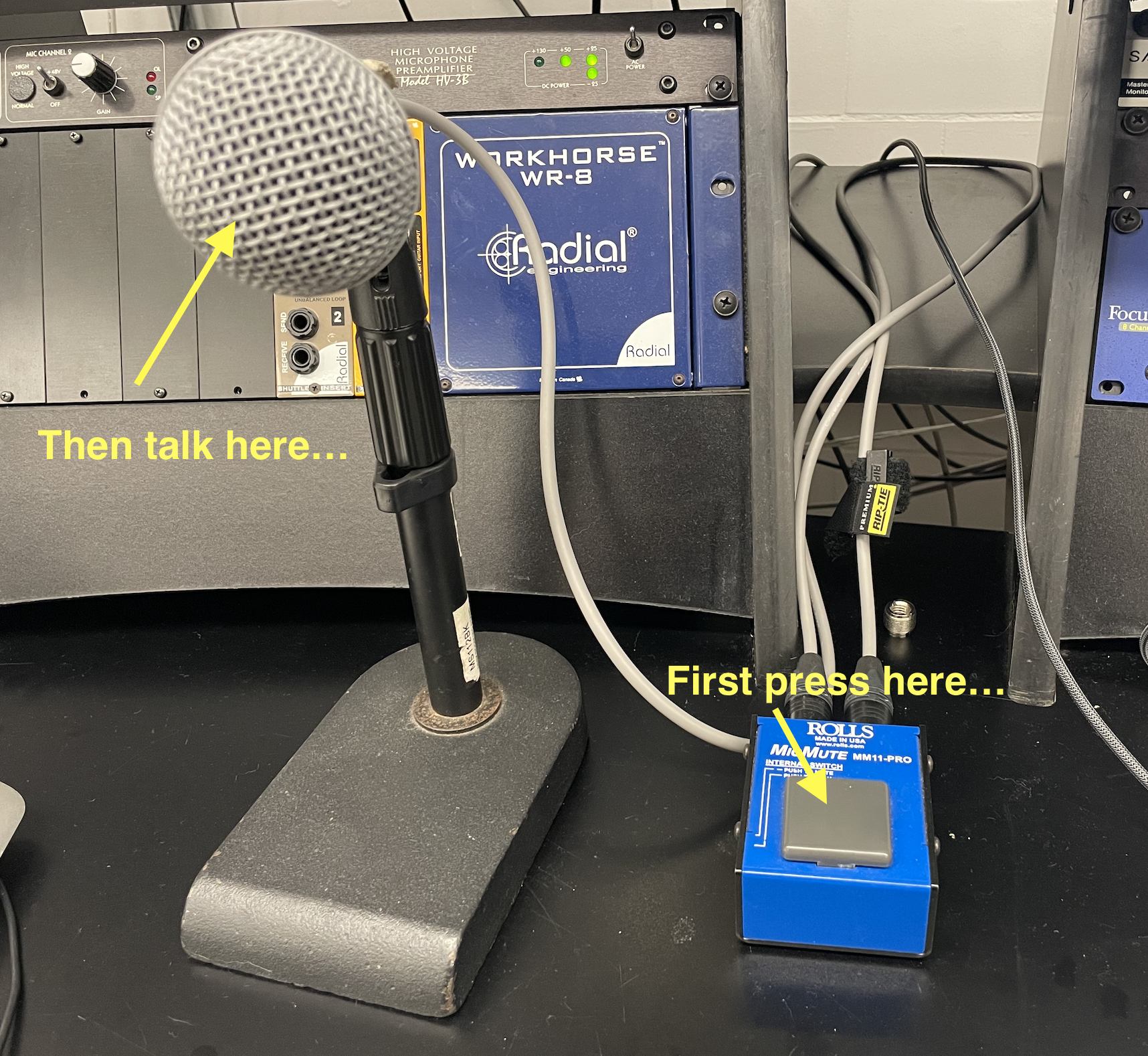
NOTE: There was an issue with talk back during class, but now it's working. Press the grey button on blue device near the mic on the desk (with white tape on top that says TALK BACK) and you should immediately hear your voice on ch16 on the AVIOM. No need to patch the talk back on the patchbay or in Logic, it is directly connected to the AVIOM ch16 (just make sure the volume is up for ch16 on the AVIOM).
4) mic in BOOTH 2, patched to the M-1 channel 1, which is then patched to UFX IN 1, monitored on AVIOM ch1, using TALK BACK mic to communicate; [OPTIONAL: send the click to AVIOM CH2].
5) (HERE YOU'LL NEED TWO MICS, and thus two tracks) ONE mic in BOOTH 1, ONE mic in BOOTH 2; BOOTH 1 patched to MILLENNIA 1 which is then patched to UFX IN 1 and monitored on AVIOM 1, BOOTH 2 mic patched to 828 ch5 which is then patched to UFX IN 2 and monitored on AVIOM 2; furthermore, import the "Passe Partout - Guitar Intro_tempo66.wav" audio file (see your previous assignment) onto a new track monitored on AVIOM 3, [and OPTIONAL: monitor click on AVIOM 4].
In the end, your project should have SEVEN tracks total (FOUR tracks for scenarios 1-4, and THREE tracks for scenario 5), with audio on each, and showing the proper signal routing for the AVIOM. Save your work in your student folder (one Logic project per team).
• In addition to the above, try out the "A" and "B" speakers on the SATORI with your various recordings.
• If you have a laptop, try to connect it to the speakers with the mini-jack cable and use the "GUEST-LAPTOP" button on the SATORI.
• Connect headphone directly to the SATORI and experiment with lowering the speaker volume while still hearing sound in the headphones. How is this different from the AVIOM?
Be prepared to present your Logic project in class
Grading:
/5 Good recording levels and good quality sound capture from the microphone
loudest parts reach -6dB, no clipping
/5 Correct signal chain
Total /10